

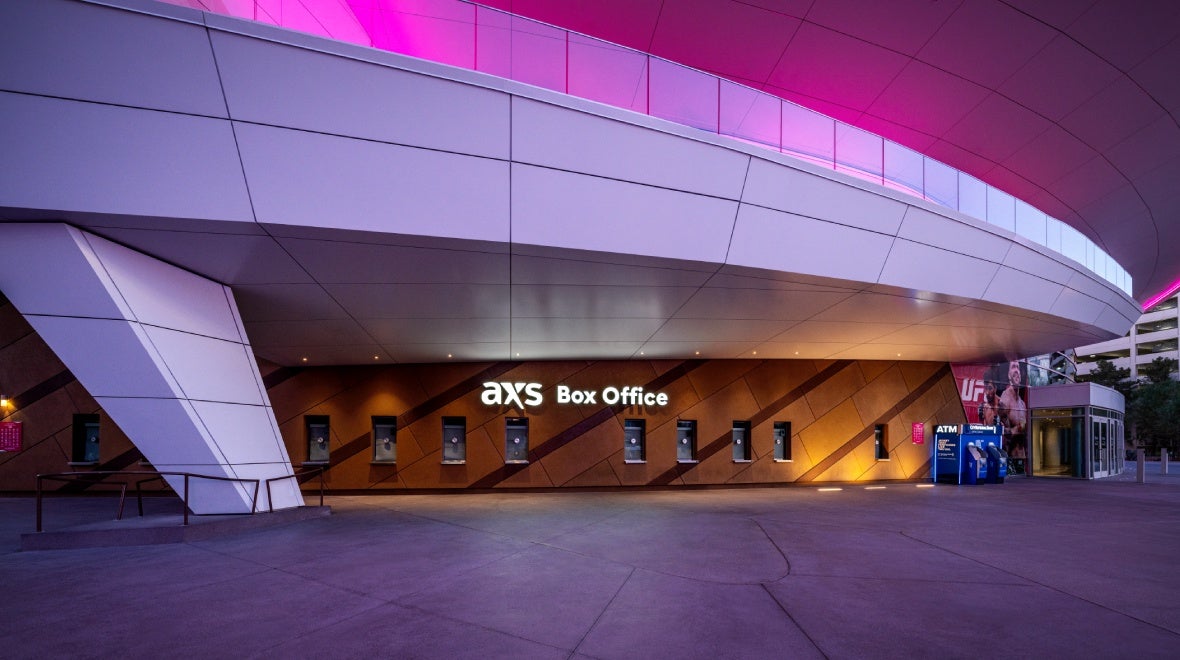
Box Office & Mobile Ticketing
The T-Mobile Arena Box Office is located on the East side of the arena facing Toshiba Plaza. Please note that the Box Office is only open on event days from 2:00PM – Start of event (hours may vary).
Mobile Ticketing allows account holders to manage, buy, sell and transfer tickets. No paper tickets required.
Mobile Ticketing Information
AXS Mobile ID
AXS Mobile ID is digital ticketing technology that provides the flexibility and convenience of safely and securely managing tickets online or in the AXS mobile app and is the preferred admission method for T-Mobile Arena.
It eliminates paper tickets and allows you to enter the venue with your AXS Mobile ID and manage your tickets digitally. AXS Mobile ID gives you the ability to transfer, sell and buy seats through an official marketplace endorsed by the venue.
Create AXS Account
Upon purchasing tickets, your AXS tickets will be automatically added to your existing AXS account.
If you do not currently have an AXS account you will be instructed to create one during your purchase.
You can also create an account without purchasing tickets by going to AXS.com and entering basic account information. After completing the account information, you may buy, sell or manage any seats in your account.
Access Mobile Tickets
- Download the AXS mobile app.
- Open the app and sign in using the email you used to purchase your tickets.
- Show the tickets in the app to the ticket taker to enter!
- Enjoy the event!
Bought tickets for a group? Make sure everyone enters together OR transfer tickets to friends before the event & have them follow the steps above to enter the venue
Transfer Tickets
A ticket transfer allows you to digitally give each guest in your party their own ticket via AXS Mobile ID. With seat transfers, you no longer need to worry about delivering the paper tickets to them in advance or meeting them outside of the gates to walk in together. There is no fee for transferring seats and you are allowed unlimited transfers.
- Click the Transfer button next to the event in your AXS account.
- Select the tickets to transfer and enter the recipient's information.
- On the review page, click the Transfer button to send the tickets.
The recipient will get an email about the transfer, and they’ll need to create an AXS account (if they don’t have one yet) to complete the transfer. After that, the tickets will be theirs to use with the AXS app.
Selling Tickets
If your tickets are eligible for resale, AXS Official Resale may be utilized to sell your tickets.
- Click the Sell button next to the event in your AXS Account.
- Select the tickets to sell, and then set your price and selling options.
- On the Review page, click the List Tickets button to finish.
You will receive an email when your tickets sell. The tickets will be delivered to the buyer automatically. You’ll be able to transfer money to your bank from your account on AXS.com
Troubleshooting
If you have any problems accessing the app or entering the arena, please visit the T-Mobile Arena Box Office for assistance!
General Box Office Information
Accessible / Disabled Tickets
Accessible/Disabled seating is available on all levels of the arena. Accessible seating and parking are available through tmobilearena.com, axs.com, and the arena box office. When ordering accessible tickets, it is important to indicate that you require accessible seating so we can properly seat you.
Address
3780 South Las Vegas Blvd
Las Vegas, NV 89158
888.929.7849
Box Office Purchases
Tickets may be purchased directly at the Box Office. T-Mobile Arena accepts the following methods of payment: American Express, Mastercard, Visa and Discover. When purchasing tickets with a credit card, you must show current, valid photo identification to complete the transaction.
The T-Mobile Arena Ticket Office does not sell tickets the first day an event goes on sale. During this time all ticket sales are handled exclusively online through AXS.com.
All sales are final. No refunds or exchanges will be permitted. Attendees under the age of 16 must be accompanied by an adult 18 or older.
Hours of Operation
Event Days: 2:00pm – Start of event
*Box Office is only open on event days.
During non-operational hours, event tickets may be purchased via AXS.com.
Vegas Golden Knights tickets may be purchased via AXS.com, VGKTicketExchange.com or directly at the T-Mobile Arena Box Office when Box Office is open for business.
The T-Mobile Arena Ticket Office does not sell tickets the first day an event goes on sale. During this time all ticket sales are handled exclusively online through AXS.com.
Media Will Call
For instructions and information on media access to T-Mobile Arena events, please contact publicrelations@mgmresorts.com
Online Purchases
Tickets can be purchased online at www.axs.com.
All sales are final. No refunds or exchanges will be permitted. Attendees under the age of 16 must be accompanied by an adult 18 or older.
Ticket Will Call
T-Mobile Arena utilizes mobile delivery of tickets. Will Call services may be available for select events. Tickets arranged for Will Call may only be picked up by the account holder whose name is on the account. A current, valid government-issued ID and credit card used to purchase tickets are required for pick-up.